Section C · Install notes
Putting 3Win8 on your iPhone, Android phone or PC
On iPhone, 3Win8 appears as '3Win8 Install' and asks you to trust a developer before it opens. How the install goes on each device, and what to check after.

3Win8 is a slot-heavy app with a small arcade and table section, distributed the usual way for this kind of platform: a direct file from your account provider and a login they issue. The 2018 page offered three builds, iOS, Android APK and Windows exe, all hosted on this site.
Why you will not find the files here
We took them down. Every one of them was an old build that the current 3Win8 servers are unlikely to accept, and the iOS one was signed with a certificate that has long since changed. Leaving executables and APKs online for years also invites someone to swap them. Ask for the current 3Win8 download link from your provider and install only that.
iPhone, step by step where it matters
Once installed, the app sits on the home screen under the name 3Win8 Install, not plain 3Win8, so look for that label.
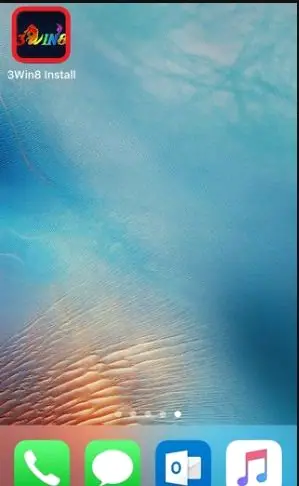
The first tap brings up Untrusted Enterprise Developer, naming "iPhone Distribution: Nice starhill sdn bhd". That is the enterprise certificate the build was signed with. It is not a statement about who operates 3Win8, and your version may show a different name.
Cancel the box and go to Settings > General > VPN & Device Management. Tap Nice starhill sdn bhd (or whatever name your build shows), then tap Trust. A second box asks you to confirm, and spells out the trade-off: trusting lets any app from that developer run and may allow access to your data.
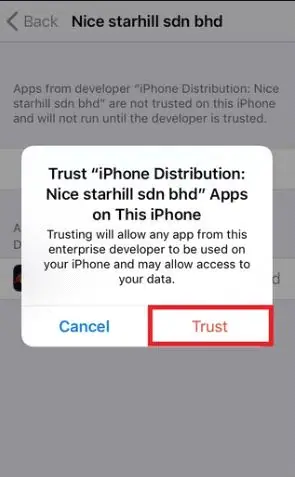
That line is the reason to trust only a build that came from your own provider. After confirming, 3Win8 shows as Verified and opens normally. If it stops opening weeks later, the certificate was revoked: delete, reinstall from a new link, trust again.
Android
Download the APK and tap it. Android will ask you to let your browser install unknown apps; allow it for this file, then turn the setting back off.
Windows
Ask your provider whether a Windows build is still supported before looking for one. If you do get an installer, scan it first and be wary of any request for administrator access.
What to read on the slot screen
3Win8's slots put the numbers along the bottom, and it pays to read them before the first spin.
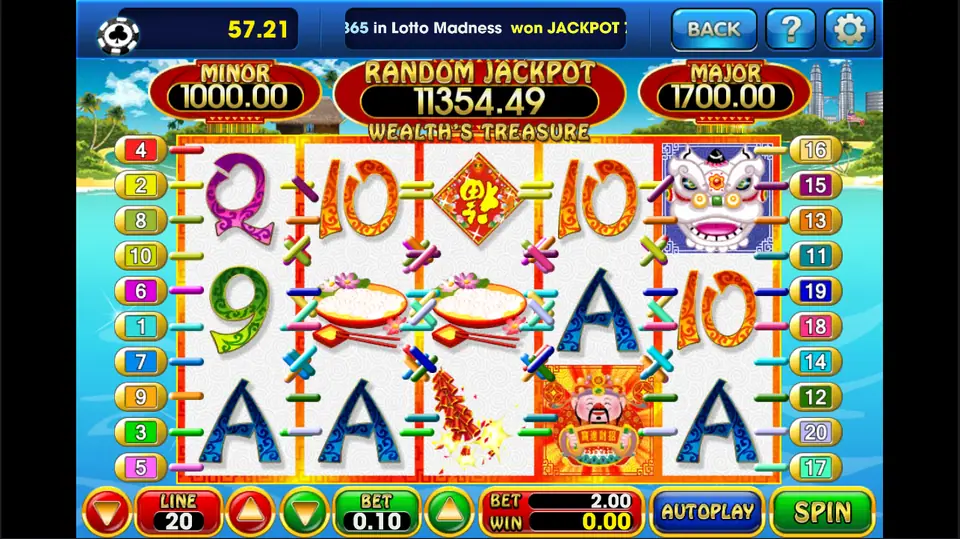
In Wealth's Treasure the LINE box says 20 and the BET box 0.10, so the red panel beside them shows a total of 2.00 per spin, against a balance of 57.21 in the top-left corner. The three counters above the reels (Minor 1000.00, Random Jackpot 11354.49, Major 1700.00 at the time) are the jackpots on offer, not anything you are close to. Twenty spins at 2.00 is 40, most of that balance.
More about the 3Win8 lobby and how agent top-ups work is on the 3Win8 platform page. Other apps are in downloads.
3Win8 is unregulated and online gambling is restricted in Malaysia. It is for adults only. Keep top-ups small and treat them as spent.
Questions readers ask
My iPhone shows '3Win8 Install' under the icon. Is something wrong?
No. In the old screenshots that is simply the name the app carries on the home screen, even after installing. Tap it and deal with the trust prompt.
Can I move my 3Win8 ID to a new phone?
Yes. Install the app on the new phone and log in with the same username and password; the credit is tied to the ID, not the device.
18+ only. Real-money games; online gambling is restricted in Malaysia. Never top up money you need, and stop if it stops being fun. Responsible gaming.